ArcDLP started because I got tired of sketchy websites. You know the ones. Paste a YouTube link, get hit with five pop-ups, wait through three fake loading screens, and maybe get your video. Or maybe get malware.
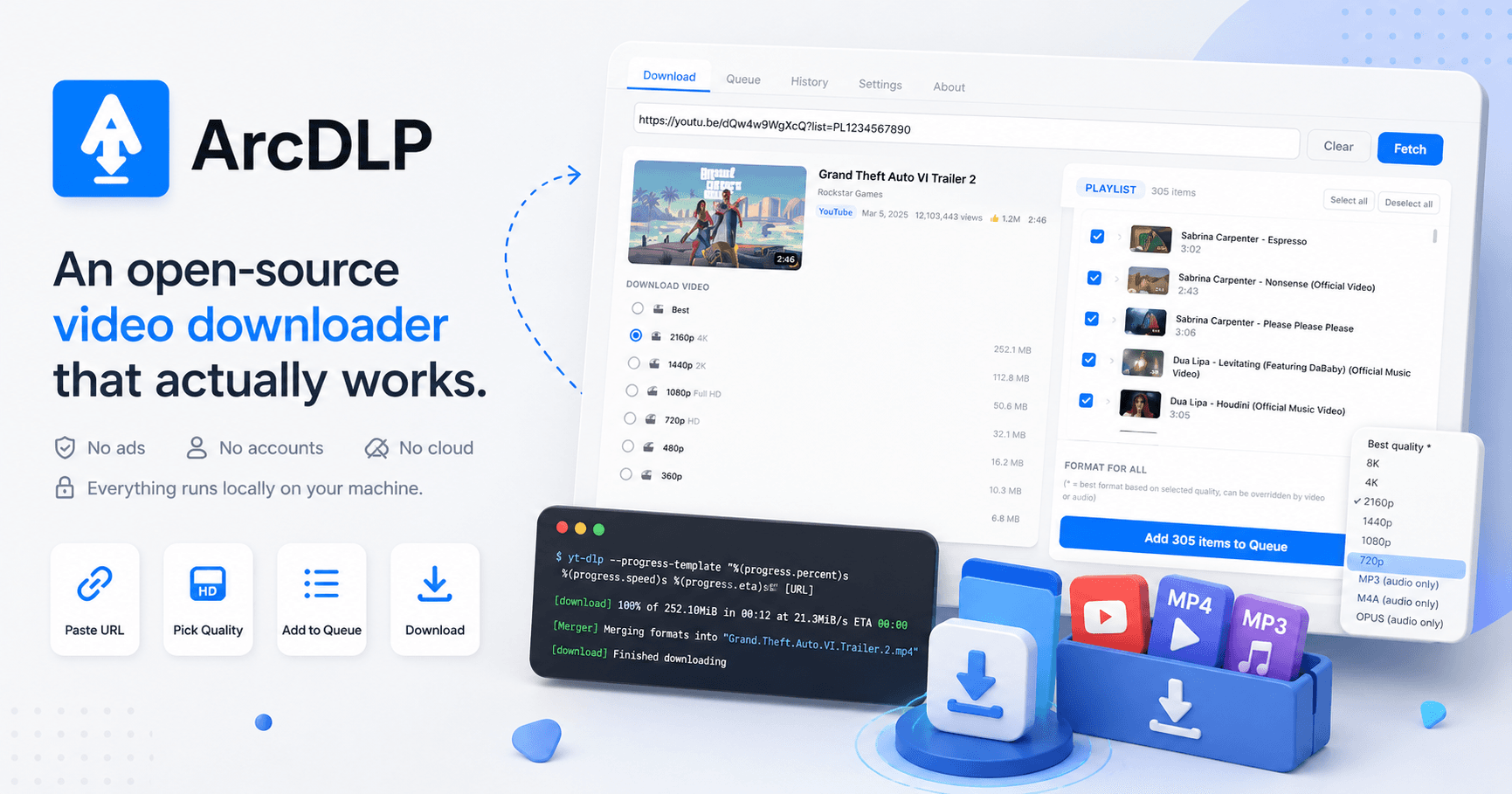
I wanted something simple. Paste a URL, pick a quality, download. No ads, no accounts, no cloud uploads. Everything runs on your machine. That is ArcDLP.
Why Not Just Use yt-dlp Directly?
yt-dlp is incredible. It supports thousands of websites, handles every edge case imaginable, and is actively maintained by a massive open-source community. But it is a command-line tool. You need to know flags, format codes, and terminal commands to use it.
Most people do not want to open a terminal. They want to paste a link and click a button. ArcDLP is a desktop GUI that wraps yt-dlp and gives it a proper interface. The philosophy is simple: let yt-dlp do the heavy lifting and stay out of its way.
The Stack
Electron, vanilla JavaScript, and two runtime dependencies. That is it. No React, no build tools, no framework. The entire renderer is a single HTML file with inline CSS and JS. The main process is split into focused modules for the queue, updates, and yt-dlp integration.
I made this choice deliberately. The app is a GUI wrapper. It does not need a component tree or a virtual DOM. It needs to spawn processes, parse their output, and update a progress bar. Vanilla JS does that fine.
The Download Queue
This was the first real engineering challenge. Early versions of ArcDLP downloaded one video at a time. You clicked download, waited, then pasted the next link. That was painful for playlists.
So I built a sequential download queue. You can add 50 videos from a playlist, pick a format for the whole batch, and let it run. Each item has its own state. Pending, downloading, completed, or failed. One failure never kills the rest. You can retry failed items, cancel the current download, or cancel everything.
The key design decision was sequential processing. Not parallel. yt-dlp spawns ffmpeg for format merging and audio extraction, and running multiple instances simultaneously eats CPU and causes failures on slower machines. One at a time, reliably, turned out to be the right call.
Spawning Processes and Parsing Output
The core of ArcDLP is surprisingly simple. It spawns yt-dlp as a child process, passes the right flags, and parses stdout line by line. For fetching video info, it runs yt-dlp --dump-json and parses the JSON blob to extract the title, thumbnail, available formats, and duration. For downloading, it uses yt-dlp's --progress-template flag which outputs structured progress data that the app can parse into a clean percentage, speed, and ETA.
The tricky part is error handling. yt-dlp can fail in a dozen different ways depending on the site, the video availability, format selection, or network conditions. Each error message is different. Some are recoverable, some are not. The app catches everything, surfaces a clean error to the user, and moves on to the next item in the queue. No crash, no freeze, just a "failed" state with a retry button.
Format Detection Across Sites
This is something that sounds simple but absolutely is not. Every site serves video differently. YouTube gives you a list of separate video and audio streams that need to be merged. Vimeo gives you combined formats. Twitter gives you a single MP4. SoundCloud gives you audio only.
ArcDLP normalizes all of this into a consistent set of quality presets. 4K, 2K, 1080p, 720p, and so on. The app reads the available formats from yt-dlp's JSON output, figures out what is actually available for that specific video, and builds a preset list. If a video only goes up to 720p, that is the highest option shown. If it is an audio-only source, the app offers MP3 extraction instead.
The goal was to never show the user a format code or a technical label. Just "1080p" or "720p" or "Audio (MP3)." Let the app figure out which yt-dlp format string makes that happen.
Writing a README That Developers Actually Read
This might be the thing I spent the most time on outside of the app itself.
I have read hundreds of open-source READMEs. Most of them fall into two camps. Either they have three lines and a broken screenshot, or they are 10,000 words of generated documentation that nobody reads. I wanted something in between.
The structure I landed on was: users first, developers second. The top half is for anyone who just wants to download the app. Platform-specific install instructions, feature list, usage guide. No jargon. The bottom half is for contributors. Project structure, architecture decisions, how to build from source, and a detailed roadmap of what could be built next.
I also wrote down the project's principles explicitly. Keep it simple. Resilience first. Explicit actions only. Let yt-dlp do the work. Multi-site compatibility. These are not aspirational. They are rules I follow when reviewing PRs. Writing them down saves everyone the guesswork of "what kind of code belongs here."
The roadmap section lists specific yt-dlp features that could be surfaced in the GUI, with the actual flags involved. Subtitle downloads, SponsorBlock integration, format filtering, chapter splitting. Each one is a self-contained contribution that someone can pick up without understanding the whole codebase. That was intentional. I wanted people to look at the README and immediately see something they could build.
I even listed known cleanup items. Things like "queue has no upper bound" and "log type detection is greedy." Being honest about rough edges makes contributors more comfortable opening PRs. Nobody wants to contribute to a project that pretends to be perfect.
What I Learned
Building ArcDLP taught me more about Electron's process model than any tutorial ever could. The IPC layer between main and renderer, context isolation, the preload bridge, managing child processes from the main process. You do not fully understand these things until you have a download queue spawning yt-dlp processes while the renderer needs real-time progress updates.
It also taught me that open source is mostly about communication. The code is the easy part. Writing clear documentation, responding to issues, defining contribution guidelines, and making the project approachable for strangers is what actually makes a project grow.
ArcDLP now has over 100 GitHub stars. Not a massive number, but every single one represents someone who found the app useful enough to save it. That feels good.